 Viseum AI Surveillance Video Monitoring Software
One checkpoint record per vehicle
Many checkpoints run separate systems for the undercarriage, the plate, the driver and the barrier, each with its own screen. The inspector has to join them up under pressure. The Viseum Checkpoint brings them together.
An under vehicle surveillance system (UVSS) images the underside of each vehicle at a checkpoint and flags anything that should not be there. The Viseum Checkpoint is a UVSS for borders, military bases, embassies, government buildings, ports, prisons, airports, stadiums and energy sites that must check vehicles quickly without missing what is hidden beneath them. It goes further than an under vehicle inspection system on its own: it builds one checkpoint record for each vehicle.
For each vehicle, one record holds:
- the undercarriage image and the AI result;
- the number plate, read by ANPR;
- the make, model and colour check against the registration;
- driver and occupant face images, where the law allows;
- an overview image of the whole vehicle;
- the operator’s decision and the barrier state;
- the time, lane and checkpoint.
The record goes to Viseum command and control and to Global F3 find, fix and follow software, so a vehicle can still be followed after it leaves the checkpoint.
AI undercarriage imaging
As the vehicle drives over the scanning lane, a high-speed area camera and 3D depth imaging build a complete, sharp picture of the undercarriage. Depth helps to show objects that are the same colour as the metal around them. The AI then checks the image in two ways.
Compare with the last visit. Many vehicles come back again and again, such as staff, delivery and patrol vehicles. The system finds the vehicle’s own earlier image by its plate, or by its undercarriage fingerprint if the plate is missing or changed. It then highlights what has changed since that visit.
Spot what does not belong. At borders, most vehicles have never been seen before. Here anomaly detection flags objects and shapes that do not fit a normal undercarriage of that kind of vehicle.
Anything flagged is marked on screen for the inspector, who decides whether to clear, search or refuse the vehicle.
Plate, vehicle and driver
ANPR reads the plate and checks it against your watchlists. Viseum Vehicle Cross-Check confirms that the make, model and colour match the registration, which helps to catch cloned and swapped plates. Cameras capture the faces of the driver and occupants. Where the law allows, these can be matched against a lawfully held watchlist with face recognition, for the operator to confirm. An overview camera records the whole vehicle, including the roof and load area.
Vehicle checkpoint security from approach to barrier
Detection without denial is not enough. The barrier is interlocked with the checkpoint record, so it stays closed until the checks are complete and the operator releases it. Associated vehicle barriers are specified to the impact standard ISO 22343-1.
The approach is watched as well as the lane. The Viseum 360 Security Camera and the Viseum thermal AI camera watch the queue and the approach roads, and follow any vehicle or person that turns away. At borders, Viseum surveillance radar gives wide-area warning of vehicles approaching away from the road.
Designed by Viseum, installed by certified partners
Viseum designs the checkpoint system and its Software Technology Services. The scanning lane is made under licence and built and installed by Viseum certified partners. Fixed and portable lane options are specified for each project, and the whole checkpoint is configured to the site, the traffic and the threat.
What to specify
Buyers should ask every supplier for tested values, with the test conditions. These are the parameters we confirm with you for each project.
| Parameter | What to require | Viseum Checkpoint |
|---|---|---|
| Vehicle speed range | The speeds at which a full, sharp image is captured, including stop-start traffic | Confirmed per project |
| Load rating | The heaviest axle load the scanning unit carries, for trucks, buses and armoured vehicles | Confirmed per project |
| IP rating | Protection of the scanning unit against water and dust | Confirmed per project |
| Operating temperature | The lowest and highest temperatures for reliable operation | Confirmed per project |
| Image time | Time from the vehicle passing to a full image and AI result on screen | Confirmed per project |
| Barrier standard | Vehicle barrier impact rating to ISO 22343-1 | Confirmed per project |
| Vehicle clearance and width | The range of ground clearance and vehicle width covered | Confirmed per project |
| Plate formats | The plate styles and scripts the ANPR reads in your country | Confirmed per project |
Frequently asked questions
Does the vehicle have to stop?
The vehicle drives over the scanning lane at low speed. The speed range, including stop-start traffic, is confirmed for each project.
What happens when the AI flags something?
The area is marked on the image and the barrier stays closed. The inspector looks at the image and the rest of the record, and decides whether to clear, search or refuse the vehicle.
How is a vehicle checked if it has never been seen before?
Anomaly detection compares the undercarriage with what a normal undercarriage of that kind looks like, and flags what does not fit. The image is kept for comparison on the vehicle’s next visit.
Can it check trucks and buses?
The load rating, clearance and width are specified to the vehicles that use your checkpoint and confirmed per project.
Can it join the cameras and control room we already run?
Each vehicle record goes to Viseum command and control and to Global F3, so the inspector works from one screen. How it joins the video management system you already run is scoped and confirmed for each project.
Can we see it working before we decide?
Yes. We arrange a live demonstration, either online from your own desk or on your site with a Rapid Deployment trailer.
Does it work at night and in bad weather?
The scanning lane has its own lighting, so it does not depend on daylight. The IP rating and operating temperature are confirmed for your climate.
What data is kept, and for how long?
Checkpoint records are kept for the period your law and policy allow. Access is limited to authorised staff and is logged.
To plan an under vehicle surveillance system for your checkpoint, book a private briefing or a demonstration with the Viseum team.
More in Intelligent Video Analytics
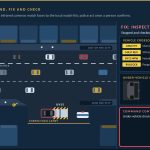
 Under Vehicle Surveillance System (UVSS)
 Vehicle Cross-Check
 AI Video Analytics
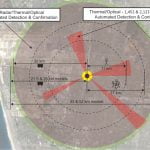 Border Control and Border Security
 Face Recognition Software
- F3: Find, Fix and Follow
 Face Recognition Analytics
 Traffic management software
 Video Management System (VMS)
 Advanced Surveillance Technology
- See everything in Intelligent Video Analytics
Viseum AI camera on TV

What happens after you contact Viseum
A specialist reads your project questionnaire for a commercial review and checks it against projects we have already delivered.
We arrange a live demonstration, either online from your own desk or on your site with a Rapid Deployment trailer.